
Demystifying "Reasonable Security": A Guide for Small Businesses
Small businesses are the backbone of the U.S. economy, making up 99% of all business entities, employing nearly half of the US workforce, and contributing to 44% of the US GDP. Unfortunately, these vital businesses face an increasingly complex and hostile digital landscape where they carry an unfair burden of risk.
Cybercriminals often target small businesses precisely because of their size. Owners and employees wear multiple hats, and dedicated IT or cybersecurity specialists are a luxury many can't afford. This reality is not lost on attackers; in 2023, 43% of all cyberattacks targeted small businesses. The consequences can be devastating, with 60% of small businesses closing within six months of a significant data breach.
As a business owner, you juggle countless responsibilities, from sales and operations to customer service. Now, a growing number of laws and regulations are adding another critical item to your list: implementing "reasonable security" to protect customer and company data.
For many small business owners, this requirement can be daunting. Laws from the Virginia CDPA to FTC regulations state that businesses must maintain a "reasonable" level of security, but they often fail to provide an explicit definition of what that means. This ambiguity can create risk and uncertainty for companies trying to manage their compliance needs.
So, what does "reasonable security" actually look like, and where can a busy business owner even begin? This guide will break it down into simple, actionable steps.
Templates
What is "Reasonable Security"? 🤔
To date, there is no single, national standard in the United States that defines "reasonable security" for all businesses. Instead, an increasing number of laws require it, leaving businesses to interpret the meaning. The table below outlines several key regulations that mandate "reasonable" or "appropriate" security measures.
- The size and complexity of your company
- The nature and scope of your business activities
- The sensitivity of the information you handle
- The cost and availability of security tools
- The resources you have available
In short, a small local retailer is not expected to have the same level of security as a multinational financial institution. However, both are expected to take appropriate, common-sense steps. Increasingly, regulators are pointing toward established cybersecurity frameworks as the benchmark. The California Attorney General, for example, stated in a 2016 report that failing to implement the CIS Critical Security Controls "constitutes a lack of reasonable security".
The Benefits of Being "Reasonable" 🛡️
Implementing a foundational security program isn't just about compliance; it's one of the smartest investments you can make in your business's health and longevity.
Legal Protection with "Safe Harbor" Laws
Several states have enacted "safe harbor" laws. These laws provide incentives, such as protection from punitive damages in a lawsuit, if your company can demonstrate it has implemented a recognized cybersecurity framework like:
- NIST Cybersecurity Framework (NIST CSF)
- CIS Critical Security Controls (CIS CSC)
Here are the states that currently offer such protections:
The data is clear: companies that practice good cyber hygiene experience far better outcomes. Research shows that organizations achieving a state of reasonable security experience:
- 62% lower breach risk
- 69% less financial impact when a breach does occur
- An impressive 238% Return on Security Investment (ROSI)
Furthermore, mature security practices, like Zero Trust, can save nearly $1.76 million in average breach costs compared to organizations without them.
Step One: Know What You Have
Before you can protect your business, you must know what you need to protect. This foundational step is often called Asset Management. It's a simple concept: identify what you have and where you have it. Here are two options to get started:
Option 1: Create a Basic Inventory List
-
Identify Your Systems: Make a list of all the technology you use to run your business. This includes software applications, servers, employee desktops and laptops, company mobile phones, and any other devices connected to your network.
-
Identify Your Data: Determine what types of data you handle and where it's stored. Do you have sensitive customer information (like names, addresses, credit card numbers), employee records, or confidential business financial data? Knowing what data is most critical will help you prioritize your security efforts.
Option 2: Use a FMEA Template
You can use this simple Failure Mode and Effects Analysis (FMEA) spreadsheet. This template will help you create a basic inventory of your company's technology and start thinking about what types of risks could create problems for your operations. This inventory will be invaluable for the second step.
Once you have a clear picture of your assets, you can begin taking prioritized steps to protect them.

Note: This FMEA exercise is the process of reviewing a company's technology footprint to identify potential risks from failure modes.
Step Two: Follow a Prioritized Action Plan ✅
Getting started doesn't have to be complicated or expensive. Experts agree that mastering the fundamentals provides the biggest impact. The CIS Critical Security Controls are widely recommended as a prioritized, effective starting point for any cyber defense program.
To help you get started, CIS provides a free online tool, the CIS Controls Self Assessment Tool (CIS CSAT), which enables businesses to assess and track their implementation of the CIS Controls.
CIS CSC IG1
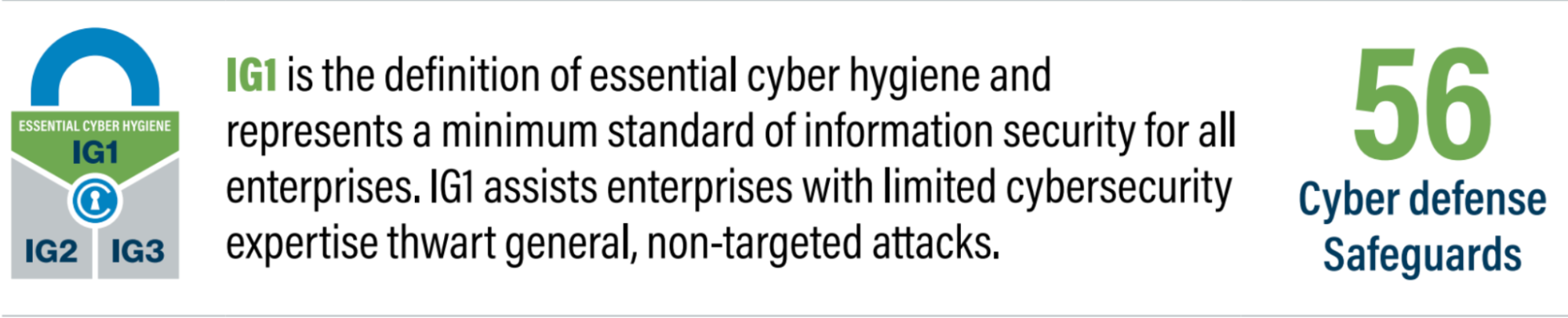
CIS recommends starting with Implementation Group 1 (IG1), which is designed as "essential cyber hygiene" for all enterprises, especially small businesses. This is a "must-do" list that consists of 56 foundational safeguards.
How effective is IG1
Implementing The CIS CSC IG1 group of controls can defend against 77% of the techniques used in the top five most common cyberattacks, including malware and ransomware.
The IG1 safeguards are thoughtfully organized into distinct categories, providing a comprehensive and intuitive roadmap for businesses to enhance their cybersecurity posture. This categorical grouping allows for a more structured and manageable approach to implementing essential security measures, ensuring that all critical areas are addressed systematically.
Practically. Achieving essential cyber hygiene is more accessible than most business owners think. Recognizing that small businesses need cost-effective guidance, CIS published a detailed guide, The Cost of Cyber Defense: CIS Controls IG1.
This guide breaks down the tools and associated costs for small businesses. For example, for a "Tier 1" company (1-10 employees), the annual cost to implement all of IG1 can range from $0 to $38,124. This is well within a typical cybersecurity budget and demonstrates that a strong defensive posture is achievable without breaking the bank.
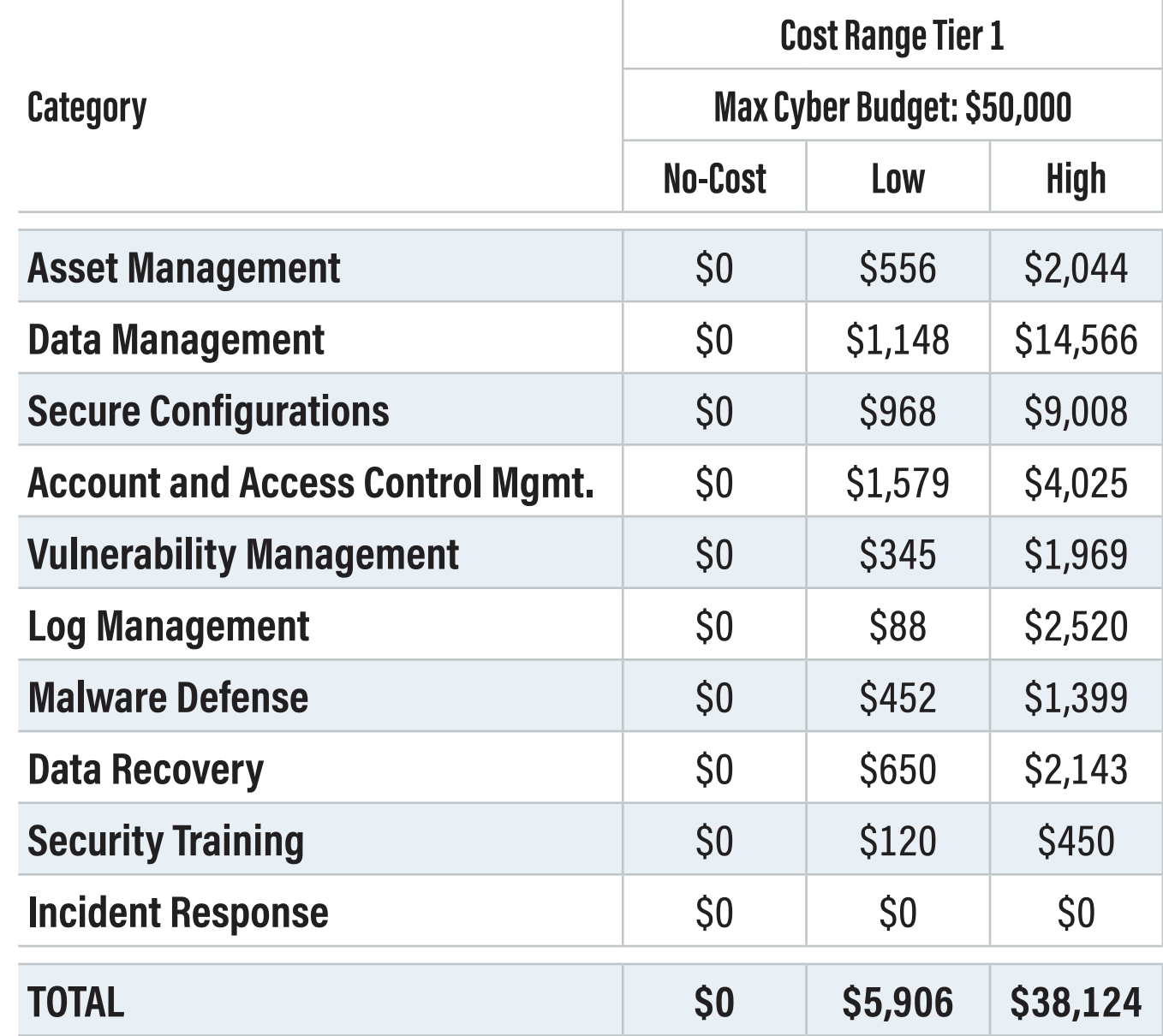
Note: This table is provided by CIS as an estimated cost to implement Tier 1 for IG1.
The Takeaway
"Reasonable security" is no longer an ambiguous legal burden. It's a tangible, achievable goal defined by established best practices. By first creating an inventory to understand your unique assets and then focusing on the fundamentals outlined in the CIS Controls IG1, you can not only meet your legal obligations but also build a more resilient, competitive, and trustworthy business. Don't wait to become a statistic—start your journey toward reasonable security today.